This one’s a practical coding article, one that I haven’t done in quite a while. It’s something I’ve come across often over the years so I’ve always wanted to have an article to point people to, so here it is.
Here’s the premise: you’re making a game (or really any program) that reads data, whether that’s game data, config files, save files and so on. When these files get extended (like adding new fields or even changing the meaning of existing fields), you want the old files to still be usable, and not be made obsolete. This is backward compatibility, and it’s great to have.
A common misperception is that backward compatibility is always hard. Understandable since we often hear about vendors breaking it, or when vendors do provide it, it’s made a big deal out of (e.g. when Sony fans tout that new PlayStation consoles can play previous gen games, or when Microsoft fans tout the legendary backward compatibility of Windows). Maintaining backward compatibility for complex systems is indeed hard, but when we’re talking about simple config or data files, it’s surprisingly easy. Even novice programmers can do it, in fact.

Starting off: don’t overthink it, keep it simple
Let’s work through an example which is based on something I’ve personally worked on. Suppose you have a game where players can choose from a few different characters, and this choice is saved, for example in a save file. The number of characters is hard coded and stored in a list, so the simplest thing to do is save the index of the character. Using it is easy; we use the save index directly in our character array.
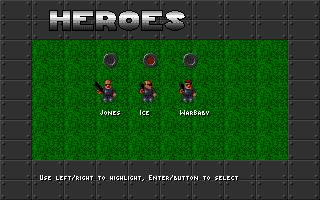
Save file:
name: 0
Loading code:
CHARACTERS = [
    {"name": "Jones", "head_sprites": "jones.png"},
    {"name": "Ice", "head_sprites": "ice.png"},
    {"name": "WarBaby", "head_sprites": "warbaby.png"},
]

def load_save(file):
    i = file["name"]
    character = CHARACTERS[i]
Later, if we want to add more characters, we need to add them at the end of the list. This way save files using the existing characters still work.
Adding new fields: make it optional, use default values
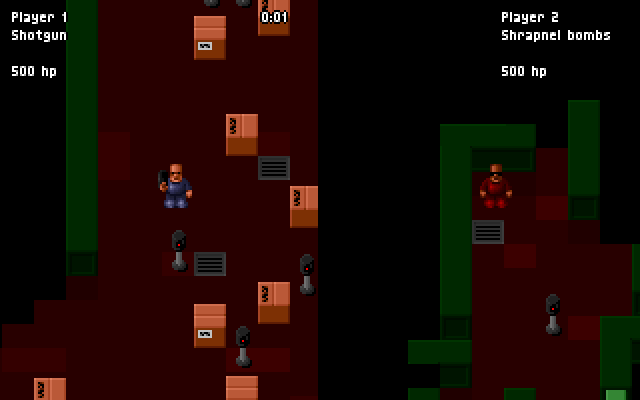
Notice the characters are all dark blue. Now suppose we want to be able to customise the character colours, out of a fixed list. We can add a new color field, but what about the old save file, it doesn’t have the field! No problem, we can handle this in code and assume the lack of the field means the default colour, dark blue:
name: 0
color: red
COLORS = {"red": "#ff0000", "green": "#00ff00", "dark blue": "#000099"}

def load_save(file):
    # ...
    if "color" in file:
        color = COLORS[file["color"]]
    else:
        color = COLORS["dark blue"]
Extending a field: be supportive
Somewhere down the line we might decide a fixed list of colours isn’t flexible; we want to be able to specify any colour via hex code. Now we could introduce a new field for it, but that seems redundant. Since it’s obvious what’s a hex code and what isn’t, we can just add support for hex codes to the existing field:
name: 0
color: #ff0000
def load_save(file):
    # ...
    # Try to load hex first; if it fails load by name
    color = load_hex(file["color"])
    if color is None:
        color = COLORS[file["color"]]
Although our code is more complex, it keeps the data file simple and flexible.
Incompatible changes: use versioning
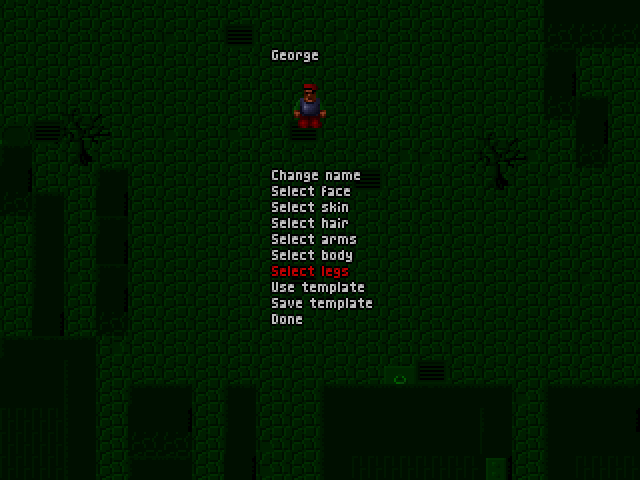
What if we are changing a field in an incompatible or non-trivial way? Let’s say we’ve decided we made a mistake with using name to specify the character. We want to be able to customise the name, separately to the character. Supporting both isn’t easy since we don’t want to stop players from using numbers as names (as silly as that seems). This is where versioning comes in, as it lets us make arbitrary changes to the file format. Let’s start our version at 1, which means when there’s no version, it’s implicitly version 0:
version: 1
name: Bob
character: 0
def load_save(file):
    if "version" in file:
        version = file["version"]
    else:
        version = 0

    if version >= 1:
        name = file["name"]
        character = CHARACTERS[file["character"]]
    else:
        character = CHARACTERS[file["name"]]
        # Use default character name
        name = character["name"]

Let’s look at a more involved example. Suppose we are several versions in, and we want to be able to customise many parts of the character - different body part colours, different hats, hairstyles and more. And we still want to support save files going all the way to the start. This is what our file and loading code might look like:
version: 10
name: Bob
hat:
  style: beret
  color: #00ff00
hair:
  style: mullet
  color: #663300
body:
  style: soldier
  color: #336699
def load_save(file):
    # ...
    if version >= 10:
        hat_style = file["hat"]["style"]
    elif version >= 9:
        # Hat style as an index
        hat_style = HAT_STYLES[file["hat"]["style"]]
    elif version >= 8:
        # Only one hat allowed, and use a flag for whether they have a hat
        has_hat = file["hat"]
        if has_hat:
            hat_style = "baseball"
        else:
            hat_style = "none"
    else:
        # No hats before version 8 :(
        hat_style = "none"
    # ... etc.
The code looks pretty hectic just for loading the hat style, so you could also choose to implement a separate load function for each version. Whichever makes sense for you:
def load_save_v10(file):
    hat_style = file["hat"]["style"]

def load_save_v9(file):
    hat_style = HAT_STYLES[file["hat"]["style"]]

def load_save_v8(file):
    has_hat = file["hat"]
    if has_hat:
        hat_style = "baseball"
    else:
        hat_style = "none"

def load_save_v7(file):
    hat_style = "none"

# ...
Why it’s so easy
Using the technique described above, I’ve managed to maintain backward compatibility for multiple data files (save files, campaigns, mods) over dozens of versions without much fuss, and so can you. So why can’t everyone do it, or when they do, it seems so effortful?
- Microsoft maintaining WIN32 backward compatibility by reproducing decades of bugs so old programs work the same way
- PlayStation 3 had to include PlayStation 2 chips in order to play those games
- Apple putting in lots of effort to make Rosetta work well, including timing it with big hardware performance bumps so that users don’t notice the emulation delays as much
Of course our example of loading a simple file containing a character definition is easy because it’s so simple. Other well known examples of backward compatibility are much harder because:
- They are way more complicated: a software program is much harder to maintain compatibility than a static, simple file format
- They are performance critical, whereas loading a save file for example doesn’t need to run in real time
So in most cases, maintaining backward compatibility is simple and effective. The next time you’re thinking about backward compatibility, and whether a change may break it: don’t worry, just add some translation code and you’re done!